Test Automation Configuration
You can open the Test Automation Configuration popup from both environments:
- Cloud environment
- Local environment
Configuration popup
This popup displays all the configuration options required to run the test automation process on the appropriate browser instance, either on a local device or in the cloud.
The two main options are Environment and Localization. These define the test data configuration used during execution (for example, a staging environment).
Note: Default environment and localization options are selected.
Advanced options include:
- Operating System – detected and set automatically
- OS Version – the latest available version is used
- Device – Desktop or Mobile browser (mobile support in progress)
- Browser – Chrome, Chromium, Firefox, or WebKit (Safari)
- Screen Resolution – five size options to choose from (for desktop)
- Timeout options – Test Case Timeout (10 min), Page Load Timeout (1 min), Action Timeout (30 sec), Validation Timeout (15 sec)
- Screenshot – Always, On Failure, or Never
More options are also available to control session, network, console and tracer logs.
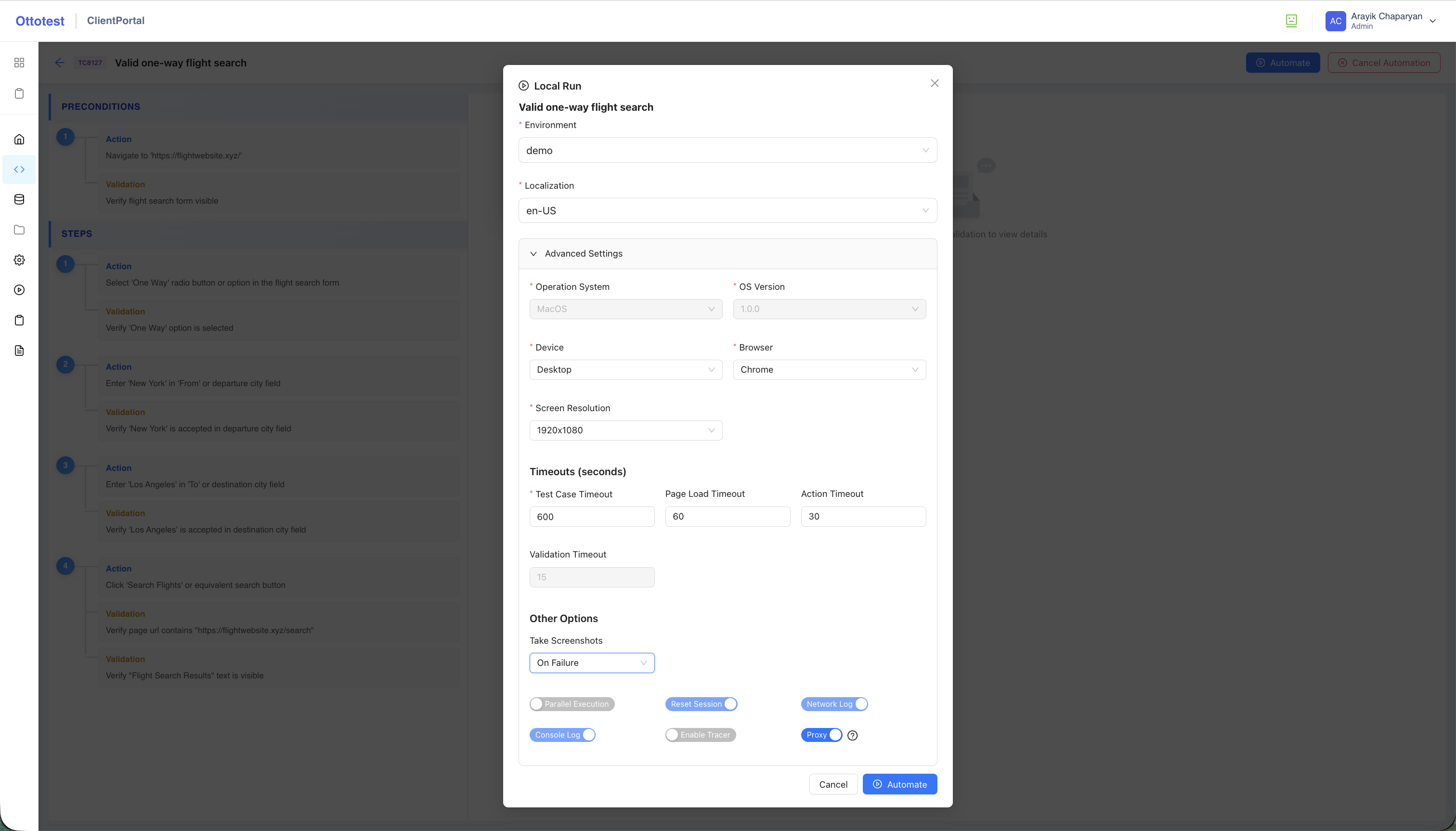
Note: The Proxy toggle option is available only for local runs. It allows test automation execution to use the same IP as in the cloud when necessary. By default, it is switched ON.