Import Test Cases from CSV
Ottotest allows you to quickly create multiple test cases by importing them from a CSV file.
Once you have selected a section or sub-section in your project's Tests Repository tree view, you can choose the option to create test cases by importing a CSV file.
This feature is especially useful when migrating test cases from other test management tools or when creating test cases in bulk.
Note: CSV files can usually be exported from tools such as TestRail, BrowserStack, Xray, Google Sheets, or other test management platforms.
You can download a sample CSV file to understand the required format.
Required Fields
When preparing your CSV file, several columns must be included for the import to work correctly. Common mandatory fields include:
- Test Case Title
- Steps
- Expected Results
- Section
Additional optional columns may also be included to provide more details, such as:
- Preconditions
- Priority
- Labels
- References
- Test Type
- ETC
Note: There are no restrictions on column names; just ensure they are mapped to the appropriate fields in ottotest during the import flow.
Once the CSV file is uploaded, Ottotest will automatically generate the corresponding test cases in the selected repository section.
Steps and Expected Results
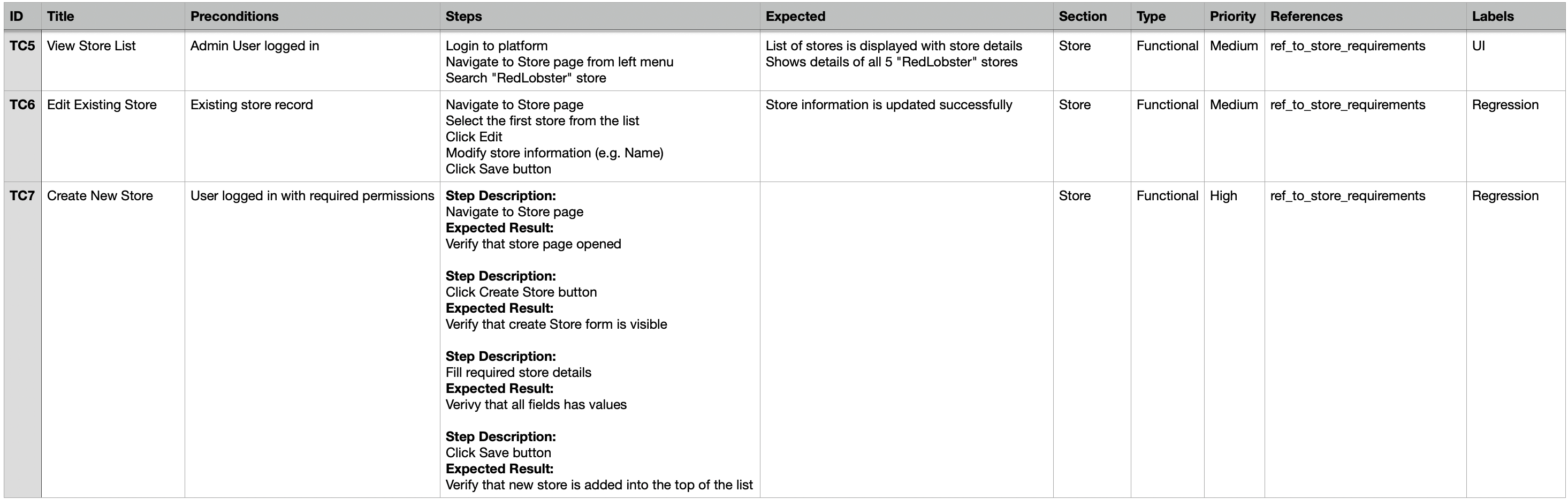
The Steps and Expected Results information in the CSV file can be provided in two formats:
1. Separate Columns
Use a “Steps” column with each step on a new line.
Use a “Expected” column to define the corresponding validation steps or expected results for each step.
2. Combined Column
Use a single column called “Steps” to define both the step and its expected result in the same cell.
NOTE: In this case, "Expected" column will be ignored.
Include keywords to separate steps and expected results.
Example:
Step Description:
Login to platform
Expected Result:
Verify that Dashboard page is opened

Step Description:
Click on Settings icon
Expected Result:
Verify that user redirected to Settings page
This format allows you to define multiple steps and their expected outcomes in a single cell, making CSV import flexible and compatible with various test case sources.